 gitsilence 的个人博客
Coding...
目录
【Claude】Claude Code Hooks 生命周期钩子完全指南
【Claude】Claude Code Hooks 生命周期钩子完全指南
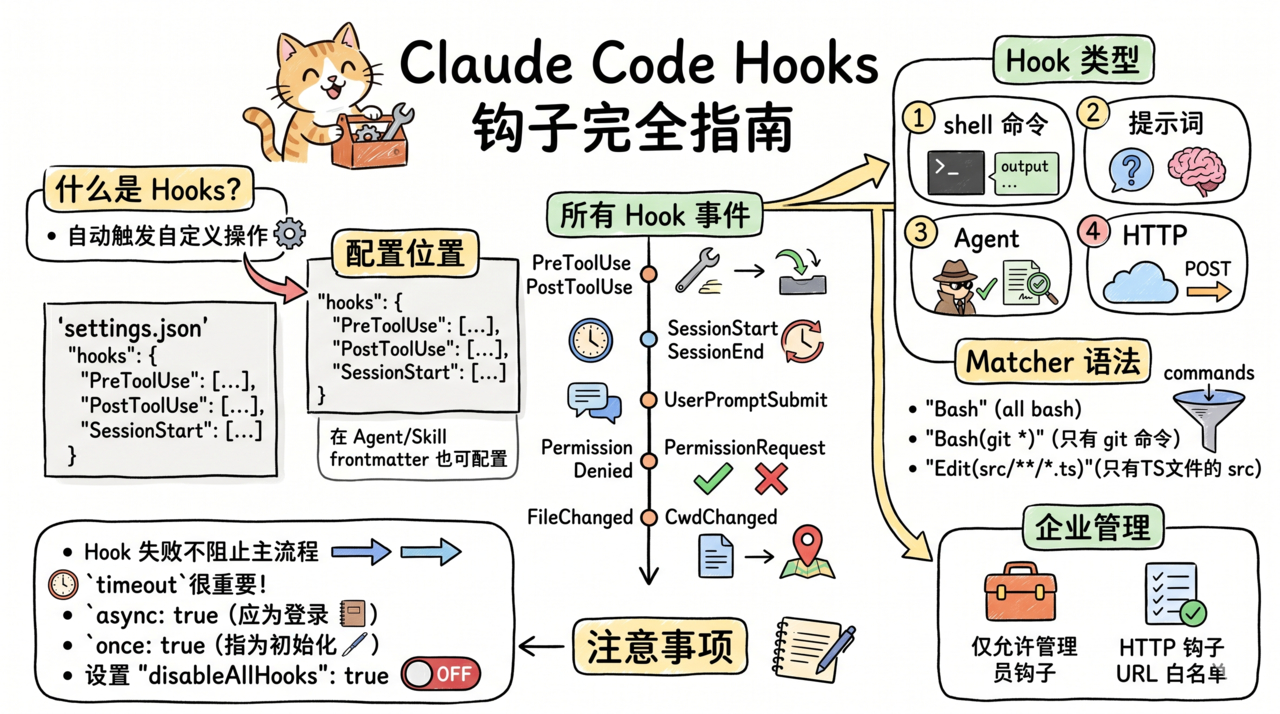
Claude Code Hooks 生命周期钩子完全指南
在 Claude Code 工作流的关键节点注入自定义逻辑,实现自动化审计、校验和通知。
什么是 Hooks?
Hooks 是在 Claude Code 执行过程中的特定事件点自动触发的自定义操作。你可以在工具调用前后、会话开始结束时、权限请求时等关键节点插入自己的逻辑。
配置位置
在 settings.json 的 hooks 字段中配置:
{
  "hooks": {
    "PreToolUse": [...],
    "PostToolUse": [...],
    "SessionStart": [...],
    ...
  }
}
或在 Agent / Skill 的 frontmatter 中配置(仅在该上下文生效)。
所有 Hook 事件
| 事件 | 触发时机 |
|---|---|
PreToolUse | 工具执行之前 |
PostToolUse | 工具执行之后 |
PostToolUseFailure | 工具执行失败后 |
Notification | 通知事件 |
UserPromptSubmit | 用户提交提示词时 |
SessionStart | 会话开始 |
SessionEnd | 会话结束 |
Stop | 停止操作 |
StopFailure | 停止失败 |
SubagentStart | 子 Agent 启动 |
SubagentStop | 子 Agent 停止 |
PreCompact | 上下文压缩前 |
PostCompact | 上下文压缩后 |
PermissionRequest | 权限请求时 |
PermissionDenied | 权限被拒绝时 |
Setup | 初始化设置 |
FileChanged | 文件变更时 |
CwdChanged | 工作目录切换时 |
WorktreeCreate | Worktree 创建时 |
WorktreeRemove | Worktree 删除时 |
ConfigChange | 配置变更时 |
InstructionsLoaded | 指令加载完成时 |
Hook 类型
1. Shell 命令 Hook(command)
{
  "hooks": {
    "PostToolUse": [
      {
        "matcher": "Bash",
        "hooks": [
          {
            "type": "command",
            "command": "echo \"$(date): Bash command executed\" >> /tmp/claude-audit.log",
            "timeout": 10,
            "statusMessage": "记录审计日志..."
          }
        ]
      }
    ]
  }
}
参数说明:
| 参数 | 类型 | 说明 |
|---|---|---|
command | string | 要执行的 shell 命令 |
if | string | 条件过滤(权限规则语法,如 "Bash(git *)") |
shell | "bash"/"powershell" | Shell 类型 |
timeout | number | 超时秒数 |
statusMessage | string | 加载提示信息 |
once | boolean | 是否只运行一次 |
async | boolean | 是否后台异步执行 |
asyncRewake | boolean | 异步执行,退出码 2 时唤醒模型 |
2. Prompt Hook(prompt)
用 LLM 评估一段提示词:
{
  "hooks": {
    "PreToolUse": [
      {
        "matcher": "Edit",
        "hooks": [
          {
            "type": "prompt",
            "prompt": "检查以下操作是否安全:$ARGUMENTS。如果安全返回 ALLOW,否则返回 DENY",
            "model": "claude-sonnet-4-6",
            "timeout": 30
          }
        ]
      }
    ]
  }
}
3. Agent Hook(agent)
生成一个子 Agent 来验证操作:
{
  "hooks": {
    "PostToolUse": [
      {
        "matcher": "Write",
        "hooks": [
          {
            "type": "agent",
            "prompt": "验证新创建的文件符合项目编码规范。检查:命名、注释、类型标注。$ARGUMENTS",
            "model": "claude-sonnet-4-6",
            "timeout": 60,
            "statusMessage": "验证代码规范..."
          }
        ]
      }
    ]
  }
}
4. HTTP Hook(http)
向外部服务发送 HTTP POST:
{
  "hooks": {
    "SessionEnd": [
      {
        "hooks": [
          {
            "type": "http",
            "url": "https://hooks.slack.com/services/xxx/yyy/zzz",
            "headers": {
              "Content-Type": "application/json",
              "Authorization": "Bearer $SLACK_TOKEN"
            },
            "allowedEnvVars": ["SLACK_TOKEN"],
            "timeout": 10
          }
        ]
      }
    ]
  }
}
实战示例
示例 1:自动化测试守护
每次编辑文件后自动运行相关测试:
{
  "hooks": {
    "PostToolUse": [
      {
        "matcher": "Edit",
        "hooks": [
          {
            "type": "command",
            "command": "npm test -- --changed 2>&1 | tail -5",
            "if": "Edit(src/**/*.ts)",
            "timeout": 60,
            "statusMessage": "运行相关测试...",
            "async": true
          }
        ]
      }
    ]
  }
}
示例 2:Git 提交前校验
{
  "hooks": {
    "PreToolUse": [
      {
        "matcher": "Bash",
        "hooks": [
          {
            "type": "command",
            "if": "Bash(git commit*)",
            "command": "npm run lint && npm test",
            "timeout": 120,
            "statusMessage": "提交前检查..."
          }
        ]
      }
    ]
  }
}
示例 3:会话审计日志
{
  "hooks": {
    "SessionStart": [
      {
        "hooks": [
          {
            "type": "command",
            "command": "echo \"[$(date)] Session started: $(pwd)\" >> ~/.claude/audit.log",
            "once": false
          }
        ]
      }
    ],
    "SessionEnd": [
      {
        "hooks": [
          {
            "type": "command",
            "command": "echo \"[$(date)] Session ended\" >> ~/.claude/audit.log"
          }
        ]
      }
    ]
  }
}
示例 4:文件变更通知
{
  "hooks": {
    "FileChanged": [
      {
        "hooks": [
          {
            "type": "http",
            "url": "https://your-api.com/webhook/file-changed",
            "headers": {
              "Authorization": "Bearer $WEBHOOK_TOKEN"
            },
            "allowedEnvVars": ["WEBHOOK_TOKEN"]
          }
        ]
      }
    ]
  }
}
Matcher 语法
matcher 字段用于过滤触发条件:
| Matcher | 匹配 |
|---|---|
"Bash" | 所有 Bash 命令 |
"Edit" | 所有文件编辑 |
"Write" | 所有文件写入 |
"Read" | 所有文件读取 |
| 不设置 matcher | 匹配所有工具 |
if 字段进一步细化(支持权限规则语法):
| if 条件 | 效果 |
|---|---|
"Bash(git *)" | 仅匹配 git 命令 |
"Edit(src/**/*.ts)" | 仅匹配 src 目录下的 TS 文件 |
"Bash(npm publish:*)" | 仅匹配 npm publish 相关命令 |
企业管理
仅允许管理员钩子
// managed-settings.json
{
  "allowManagedHooksOnly": true
}
设置后,用户级、项目级、本地的钩子全部失效。
HTTP Hook URL 白名单
{
  "allowedHttpHookUrls": [
    "https://hooks.internal.company.com/*",
    "https://api.github.com/*"
  ]
}
注意事项
- Hook 失败不会阻止主流程(除非是 PreToolUse 返回 DENY)
timeout很重要 — 避免钩子挂起阻塞整个流程async: true— 不阻塞后续操作,适合日志记录once: true— 运行一次后自动移除,适合初始化操作$ARGUMENTS— 在 prompt/agent hook 中引用 hook 输入的 JSON 数据- 禁用所有钩子:设置
"disableAllHooks": true
标题:【Claude】Claude Code Hooks 生命周期钩子完全指南
作者:gitsilence
地址:https://blog.lacknb.cn/articles/2026/04/14/1776135836474.html