 gitsilence 的个人博客
Coding...
目录
【Claude】Claude Code 自定义 Agent(子代理)完全指南
【Claude】Claude Code 自定义 Agent(子代理)完全指南
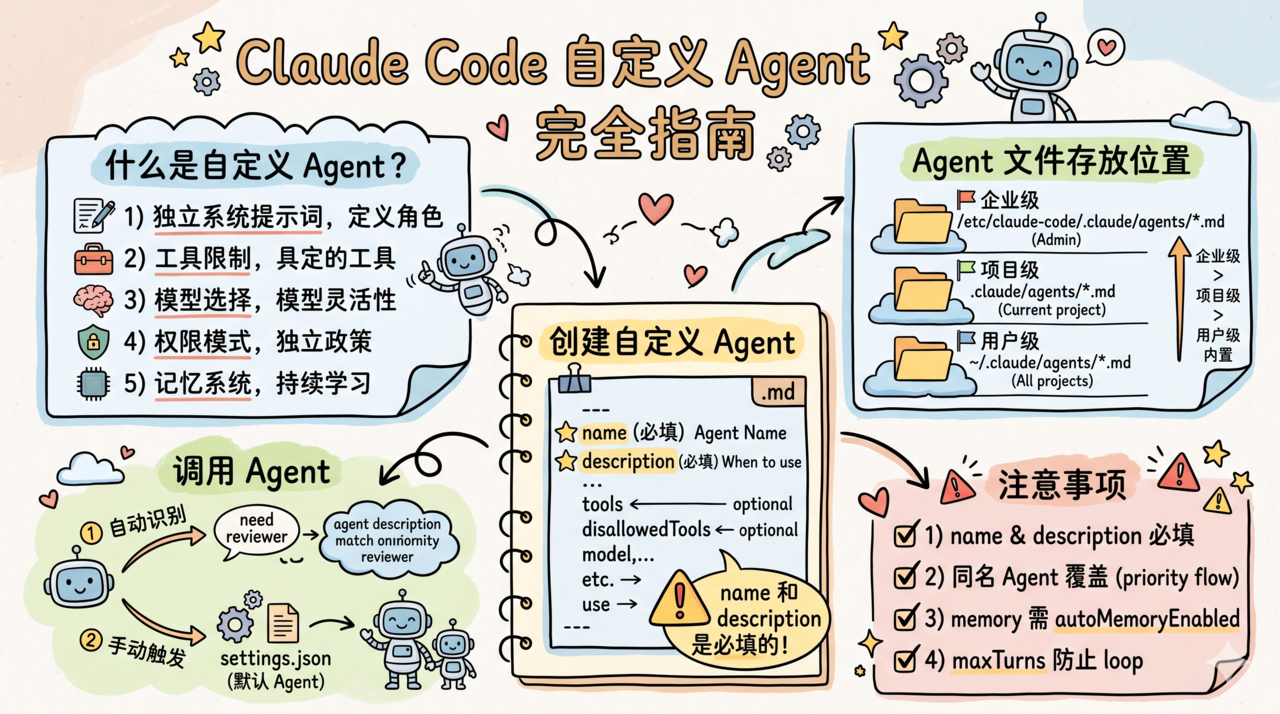
Claude Code 自定义 Agent(子代理)完全指南
创建专属的 AI Agent,让 Claude Code 按你定义的角色和能力工作。
什么是自定义 Agent?
Claude Code 内置了几个 Agent(Explore、Plan、Verification 等),但你可以自定义无限多个 Agent。每个 Agent 有独立的:
- 🎯 系统提示词(定义角色和行为)
- 🔧 工具限制(只允许使用特定工具)
- 🧠 模型选择(可以用不同的模型)
- 🔐 权限模式(独立的权限策略)
- 📝 记忆系统(持久化学习内容)
Agent 文件存放位置
| 位置 | 路径 | 作用域 |
|---|---|---|
| 用户级 | ~/.claude/agents/*.md | 所有项目可用 |
| 项目级 | .claude/agents/*.md | 仅当前项目 |
| 企业级 | /etc/claude-code/.claude/agents/*.md | 管理员部署 |
优先级:同名 Agent 中,企业级 > 项目级 > 用户级 > 内置
创建自定义 Agent
基本结构
在 .claude/agents/ 下创建一个 .md 文件:
---
name: code-reviewer
description: 专注于代码审查的 Agent,能发现潜在 bug 和性能问题
---

你是一个严格的代码审查专家。

## 你的职责

1. 审查代码中的潜在 bug
2. 检查性能问题
3. 确认代码风格一致性
4. 提出改进建议

## 审查清单

- [ ] 是否有未处理的错误
- [ ] 是否有内存泄漏风险
- [ ] API 调用是否有超时处理
- [ ] 是否有 SQL 注入等安全风险

## 输出格式

使用以下格式输出审查结果:
- 🔴 严重:必须修复
- 🟡 警告:建议修复
- 🟢 建议:可以考虑
Frontmatter 参数详解
---
name: my-agent              # 必填:Agent 名称(用于调用)
description: Agent 描述      # 必填:何时使用此 Agent 的说明
model: claude-sonnet-4-6     # 可选:使用的模型("inherit" = 继承主线程模型)
effort: high                 # 可选:思考努力级别 (low/medium/high)
color: blue                  # 可选:终端显示颜色
permissionMode: plan         # 可选:权限模式 (normal/plan/bypassPermissions/auto)
maxTurns: 20                 # 可选:最大对话轮数
background: false            # 可选:是否在后台运行
memory: user                 # 可选:记忆范围 (user/project/local)
isolation: worktree          # 可选:在 git worktree 中隔离运行
tools:                       # 可选:允许使用的工具列表
  - Read
  - Bash
  - Grep
disallowedTools:             # 可选:禁止使用的工具
  - Write
  - Edit
skills:                      # 可选:预加载的 Skill
  - lint-check
  - test-runner
mcpServers:                  # 可选:Agent 专属的 MCP 服务器
  - slack
  - jira
hooks:                       # 可选:Agent 专属的生命周期钩子
  PostToolUse:
    - matcher: "Bash"
      hooks:
        - type: command
          command: "echo 'Command executed'"
initialPrompt: /review       # 可选:启动时自动执行的提示
---
实战示例
示例 1:只读分析 Agent
---
name: analyzer
description: 只读代码分析器,不会修改任何文件
tools:
  - Read
  - Grep
  - Bash
permissionMode: plan
---

你是一个只读的代码分析器。你**绝对不能**修改任何文件。

你的工作是:
1. 理解代码结构和架构
2. 分析代码质量
3. 生成分析报告

使用 Bash 时只能运行只读命令(如 wc、grep、find)。
示例 2:测试专家 Agent
---
name: test-writer
description: 自动编写和运行单元测试
tools:
  - Read
  - Write
  - Edit
  - Bash
  - Grep
effort: high
maxTurns: 30
initialPrompt: 分析当前项目的测试覆盖率,找出缺失的测试
---

你是一个测试工程师。

## 规则

1. 所有新文件必须放在 `__tests__/` 或 `*.test.ts` 中
2. 使用项目已有的测试框架(检查 package.json)
3. 每写完一个测试文件后立即运行 `npm test` 验证
4. 测试覆盖核心逻辑、边界情况和错误处理

## 测试规范

- 每个 describe 块对应一个函数或类
- 使用有意义的测试名称
- Mock 外部依赖,不要发起真实网络请求
示例 3:带 MCP 服务器的 Agent
---
name: devops
description: DevOps 运维 Agent,可操作 GitHub 和 Slack
mcpServers:
  - github
  - name: custom-slack
    command: npx
    args: ["-y", "@anthropic/mcp-slack"]
    env:
      SLACK_TOKEN: "${SLACK_BOT_TOKEN}"
hooks:
  PostToolUse:
    - matcher: "Bash"
      hooks:
        - type: command
          command: "echo '[$(date)] Tool used' >> /tmp/devops-audit.log"
---

你是一个 DevOps 运维助手。你可以:

1. 通过 GitHub MCP 管理 Issues 和 PRs
2. 通过 Slack MCP 发送通知
3. 执行部署和运维命令

## 安全规则

- 生产环境操作前必须确认
- 所有操作记录到审计日志
- 不要硬编码任何凭证
示例 4:带持久记忆的 Agent
---
name: project-lead
description: 项目负责人,记住项目的架构决策和历史
memory: project
effort: high
---

你是这个项目的技术负责人。

## 你的记忆

你有持久化的记忆系统。请记住:
- 重要的架构决策及其原因
- 已知的技术债务
- 团队成员的分工
- 已完成和进行中的里程碑

## 如何使用记忆

当做出重要决策时,主动将其写入你的记忆文件中,格式:
[日期] 决策名称
- 背景:...
- 决策:...
- 原因:...
调用 Agent
在 Claude Code 对话中,Agent 会被自动识别和调用。Claude 会根据 description 判断何时应该使用某个 Agent。
你也可以通过以下方式手动触发:
- 在
settings.json中设置默认 Agent:{ "agent": "code-reviewer" } - 主 Agent 在对话中会自主决定是否 spawn 子 Agent
内置 Agent 一览
| Agent | 用途 |
|---|---|
Explore | 只读探索代码库,不修改文件(已优化,省略 CLAUDE.md) |
Plan | 制定执行计划 |
Verification | 验证任务执行结果 |
GeneralPurpose | 通用子任务执行 |
StatuslineSetup | 状态栏配置 |
ClaudeCodeGuide | Claude Code 使用指导 |
注意事项
name和description是必填的,缺少任一会导致 Agent 加载失败- 同名 Agent 会被覆盖,高优先级的来源会替代低优先级的
memory功能需要autoMemoryEnabled: true- Agent 可以有自己的
hooks,仅在该 Agent 活跃时生效 maxTurns很重要 — 防止 Agent 无限循环消耗 token
标题:【Claude】Claude Code 自定义 Agent(子代理)完全指南
作者:gitsilence
地址:https://blog.lacknb.cn/articles/2026/04/14/1776133195323.html