 gitsilence 的个人博客
Coding...
Langchain 中的 Todos 与 deepagents的Subagent 协作机制

Langchain 中的 Todos 与 deepagents的Subagent 协作机制
深入理解 AI Agent 如何通过任务规划(write_todos)与子代理委派(task)实现复杂任务的拆解与执行
在构建 AI Agent 时,任务规划与执行是核心挑战之一。本文将以 DeepAgents、Langchain 项目为例,深入剖析 write_todos 和 task 工具的实现原理,帮助你理解如何让 Agent 有条不紊地完成复杂任务。
依赖关系:deepagents ---> langchain ---> langgraph
一、什么时候直接完成任务,什么时候调用 write_todos?
直接完成任务
对于简单任务(1-2 个步骤),Agent 应该直接执行,无需创建 todo 列表。例如:
- "创建一个文件 hello.txt"
- "读取 config.json 的内容"
- "帮我点三份外卖"
这类任务清晰、直接,创建 todo 反而是额外负担。
使用 write_todos
当任务具备以下特征时,应该使用 write_todos 进行规划:
- 复杂多步骤:需要 3 个以上的独立步骤
- 需要跟踪进度:任务执行时间较长
- 需要用户确认:在开始执行前展示计划
最佳实践建议:
1. 保持 todo 列表精简(3-6 项)
2. 每个 todo 应该是可独立完成的工作单元
3. 创建 todo 后,先询问用户 "这个计划看起来可以吗?" 再开始执行
DeepAgents CLI (这里是针对于主Agent的Prompt)中的提示是这样写的:
# 来自 agent.py 第 171-184 行
"""### Todo List Management

When using the write_todos tool:
1. Keep the todo list MINIMAL - aim for 3-6 items maximum
2. Only create todos for complex, multi-step tasks that truly need tracking
3. For simple tasks (1-2 steps), just do them directly without creating todos
4. When first creating a todo list for a task, ALWAYS ask the user if the
   plan looks good before starting work
"""
二、TodoListMiddleware 的实现原理
TodoListMiddleware 源码位于langchain仓库:langchain/libs/langchain_v1/langchain/agents/middleware/todo.py
核心机制
TodoListMiddleware 是 DeepAgents 的核心中间件之一,它通过 langchain.agents.middleware 提供。这个中间件的关键职责是:
- 提供 write_todos 工具:让 Agent 能够创建和更新任务列表
- 管理 todos 状态:在 Agent 状态中维护
todos字段 - 防止并行调用:确保 Agent 不会同时执行多个 todo
write_todos 工具参数
# todos 参数结构
todos = [
    {
        "content": "研究用户需求",        # 任务内容
        "status": "in_progress",         # 状态: pending | in_progress | completed
        "activeForm": "正在分析需求文档"  # 当前正在做的事情(可选)
    },
    {
        "content": "编写代码实现",
        "status": "pending",
        "activeForm": None
    }
]
如何防止 Agent 一次性完成所有 todos?
这是一个关键的设计问题:如果 Agent 可以并行调用多个 write_todos,它可能会一次性把所有任务都标记为完成,失去了渐进式任务管理的意义。
解决方案:并行调用检测与拒绝
# 来自 test_todo_middleware.py 第 17-28 行
"""Test that todo middleware rejects multiple write_todos calls in one AIMessage.

This test verifies that:
1. When an agent calls write_todos multiple times in the same AIMessage
2. The middleware detects this and returns error messages for both calls
3. The errors inform that write_todos should not be called in parallel
"""

# 错误信息
expected_error = "Error: The `write_todos` tool should never be called multiple
times in parallel. Please call it only once per model invocation to update
the todo list."
工作流程图:
┌─────────────────────────────────────────────────────────┐
│                    Agent Message                         │
│  ┌──────────────┐  ┌──────────────┐  ┌──────────────┐   │
│  │ write_todos  │  │ write_todos  │  │ other_tool   │   │
│  │   call #1    │  │   call #2    │  │    call      │   │
│  └──────────────┘  └──────────────┘  └──────────────┘   │
└──────────────────────────┬──────────────────────────────┘
                           │
                           ▼
           ┌───────────────────────────────┐
           │    TodoListMiddleware 检测     │
           │   检测到 2 个 write_todos 调用  │
           └───────────────────────────────┘
                           │
                           ▼
           ┌───────────────────────────────┐
           │    返回错误信息给两个调用        │
           │    "不允许并行调用 write_todos" │
           │    状态: error                 │
           └───────────────────────────────┘
                           │
                           ▼
           ┌───────────────────────────────┐
           │   Agent 收到错误,重新规划      │
           │   下次只调用一个 write_todos    │
           └───────────────────────────────┘
这种设计强制 Agent 按照「规划 → 执行单个任务 → 更新状态 → 执行下一个任务」的模式工作,而不是一口气完成所有事情。
三、什么时候需要调用 task 工具?
task 工具用于将任务委派给子代理(subagent)。创建了 todos 之后,并非所有任务都需要用 task,以下场景适合使用:
适合使用 task 的场景
-
复杂多步骤的独立任务
比如:研究 LeBron James 的职业生涯 这个任务需要多次搜索、信息整合,但结果可以独立返回 -
需要隔离上下文的任务
分析大型代码库的安全漏洞 → 子代理专注于分析,主代理只需要最终报告 → 避免分析过程的大量信息污染主对话 -
可以并行执行的任务
比较 OpenAI、Anthropic、DeepMind 的 AI 安全方案
→ 三个独立的研究任务可以并行委派给三个子代理
不适合使用 task 的场景
- 简单任务:几个工具调用就能完成的
- 需要中间结果:主代理需要看到子代理的推理过程
- 单纯增加延迟:拆分不能带来效率或质量提升
Deep Research 示例中的策略说明了这一点:
# 来自 prompts.py 第 144-163 行
"""
**DEFAULT: Start with 1 sub-agent** for most queries:
- "What is quantum computing?" → 1 sub-agent
- "List the top 10 coffee shops in San Francisco" → 1 sub-agent

**ONLY parallelize when EXPLICITLY required:**
- "Compare OpenAI vs Anthropic vs DeepMind" → 3 parallel sub-agents
- "Research renewable energy in Europe, Asia, and North America" → 3 sub-agents

## Key Principles
- **Bias towards single sub-agent**: One comprehensive task is more efficient
- **Avoid premature decomposition**: Don't break "research X" into multiple parts
"""
四、Task 工具的实现原理
元数据代码
我们在使用task之前,需要预设几个需要的子代理: SubAgent | CompiledSubAgent
class SubAgent(TypedDict):
    """Specification for an agent.

    When specifying custom agents, the `default_middleware` from `SubAgentMiddleware`
    will be applied first, followed by any `middleware` specified in this spec.
    To use only custom middleware without the defaults, pass `default_middleware=[]`
    to `SubAgentMiddleware`.

    Required fields:
        name: Unique identifier for the subagent.

            The main agent uses this name when calling the `task()` tool.
        description: What this subagent does.

            Be specific and action-oriented. The main agent uses this to decide when to delegate.
        system_prompt: Instructions for the subagent.

            Include tool usage guidance and output format requirements.
        tools: Tools the subagent can use.

            Keep this minimal and include only what's needed.

    Optional fields:
        model: Override the main agent's model.

            Use the format `'provider:model-name'` (e.g., `'openai:gpt-4o'`).
        middleware: Additional middleware for custom behavior, logging, or rate limiting.
        interrupt_on: Configure human-in-the-loop for specific tools.

            Requires a checkpointer.
    """

    name: str
    """Unique identifier for the subagent."""

    description: str
    """What this subagent does. The main agent uses this to decide when to delegate."""

    system_prompt: str
    """Instructions for the subagent."""

    tools: Sequence[BaseTool | Callable | dict[str, Any]]
    """Tools the subagent can use."""

    model: NotRequired[str | BaseChatModel]
    """Override the main agent's model. Use `'provider:model-name'` format."""

    middleware: NotRequired[list[AgentMiddleware]]
    """Additional middleware for custom behavior."""

    interrupt_on: NotRequired[dict[str, bool | InterruptOnConfig]]
    """Configure human-in-the-loop for specific tools."""


class CompiledSubAgent(TypedDict):
    """A pre-compiled agent spec.

    !!! note

        The runnable's state schema must include a 'messages' key.

        This is required for the subagent to communicate results back to the main agent.

    When the subagent completes, the final message in the 'messages' list will be
    extracted and returned as a `ToolMessage` to the parent agent.
    """

    name: str
    """Unique identifier for the subagent."""

    description: str
    """What this subagent does."""

    runnable: Runnable
    """A custom agent implementation.

    Create a custom agent using either:

    1. LangChain's [`create_agent()`](https://docs.langchain.com/oss/python/langchain/quickstart)
    2. A custom graph using [`langgraph`](https://docs.langchain.com/oss/python/langgraph/quickstart)

    If you're creating a custom graph, make sure the state schema includes a 'messages' key.
    This is required for the subagent to communicate results back to the main agent.
    """
from langchain.agents.middleware.subagents import SubAgentMiddleware
from langchain.agents import create_agent

# Basic usage with defaults (no default middleware)
agent = create_agent(
  "openai:gpt-4o",
  middleware=[
    SubAgentMiddleware(
      default_model="openai:gpt-4o",
      subagents=[],
    )
  ],
)

# Add custom middleware to subagents
agent = create_agent(
  "openai:gpt-4o",
  middleware=[
    SubAgentMiddleware(
      default_model="openai:gpt-4o",
      default_middleware=[TodoListMiddleware()],
      subagents=[],
    )
  ],
)
没有传 subagents,则使用默认的类型
def _get_subagents(
    *,
    default_model: str | BaseChatModel,
    default_tools: Sequence[BaseTool | Callable | dict[str, Any]],
    default_middleware: list[AgentMiddleware] | None,
    default_interrupt_on: dict[str, bool | InterruptOnConfig] | None,
    subagents: list[SubAgent | CompiledSubAgent],
    general_purpose_agent: bool,
) -> tuple[dict[str, Any], list[str]]:
    """Create subagent instances from specifications.

    Args:
        default_model: Default model for subagents that don't specify one.
        default_tools: Default tools for subagents that don't specify tools.
        default_middleware: Middleware to apply to all subagents. If `None`,
            no default middleware is applied.
        default_interrupt_on: The tool configs to use for the default general-purpose subagent. These
            are also the fallback for any subagents that don't specify their own tool configs.
        subagents: List of agent specifications or pre-compiled agents.
        general_purpose_agent: Whether to include a general-purpose subagent.

    Returns:
        Tuple of (agent_dict, description_list) where agent_dict maps agent names
        to runnable instances and description_list contains formatted descriptions.
    """
    # Use empty list if None (no default middleware)
    default_subagent_middleware = default_middleware or []

    agents: dict[str, Any] = {}
    subagent_descriptions = []

    # Create general-purpose agent if enabled
    if general_purpose_agent:
        general_purpose_middleware = [*default_subagent_middleware]
        if default_interrupt_on:
            general_purpose_middleware.append(HumanInTheLoopMiddleware(interrupt_on=default_interrupt_on))
        general_purpose_subagent = create_agent(
            default_model,
            system_prompt=DEFAULT_SUBAGENT_PROMPT,
            tools=default_tools,
            middleware=general_purpose_middleware,
            name="general-purpose",
        )
        agents["general-purpose"] = general_purpose_subagent
        subagent_descriptions.append(f"- general-purpose: {DEFAULT_GENERAL_PURPOSE_DESCRIPTION}")

    # Process custom subagents
    for agent_ in subagents:
        subagent_descriptions.append(f"- {agent_['name']}: {agent_['description']}")
        if "runnable" in agent_:
            custom_agent = cast("CompiledSubAgent", agent_)
            agents[custom_agent["name"]] = custom_agent["runnable"]
            continue
        _tools = agent_.get("tools", list(default_tools))

        subagent_model = agent_.get("model", default_model)

        _middleware = [*default_subagent_middleware, *agent_["middleware"]] if "middleware" in agent_ else [*default_subagent_middleware]

        interrupt_on = agent_.get("interrupt_on", default_interrupt_on)
        if interrupt_on:
            _middleware.append(HumanInTheLoopMiddleware(interrupt_on=interrupt_on))

        agents[agent_["name"]] = create_agent(
            subagent_model,
            system_prompt=agent_["system_prompt"],
            tools=_tools,
            middleware=_middleware,
            name=agent_["name"],
        )
    return agents, subagent_descriptions
task 工具的入参
def task(
    description: str,    # 任务的详细描述,包含所有必要上下文
    subagent_type: str,  # 子代理类型,如 "general-purpose"
    runtime: ToolRuntime # 系统自动注入的运行时
) -> str | Command:
参数说明:
| 参数 | 类型 | 说明 |
|---|---|---|
description | str | 子代理要执行的任务描述,应包含所有上下文和期望的输出格式 |
subagent_type | str | 子代理类型,默认可用 "general-purpose" |
SubAgentMiddleware 实现
SubAgentMiddleware 是创建 task 工具的核心中间件:
# 来自 subagents.py 第 445-510 行
class SubAgentMiddleware(AgentMiddleware):
    """Middleware for providing subagents via a `task` tool.

    This middleware adds a `task` tool that can invoke subagents.
    Subagents are useful for:
    - Complex tasks requiring multiple steps
    - Tasks requiring a lot of context to resolve
    - Different domains requiring narrower tools
    """

    def __init__(
        self,
        *,
        default_model: str | BaseChatModel,
        default_tools: Sequence[...] | None = None,
        default_middleware: list[AgentMiddleware] | None = None,
        subagents: list[SubAgent | CompiledSubAgent] | None = None,
        general_purpose_agent: bool = True,  # 默认创建通用代理
    ):
        ...
子代理生命周期
1. Spawn (创建)
   └── 主代理调用 task(description, subagent_type)
   └── 为子代理准备隔离的状态上下文

2. Run (执行)
   └── 子代理使用自己的工具集自主完成任务
   └── 子代理拥有独立的 token 预算和上下文窗口

3. Return (返回)
   └── 子代理完成后返回单个消息
   └── 只有最终结果返回给主代理,中间步骤被丢弃

4. Reconcile (整合)
   └── 主代理收到 ToolMessage 形式的结果
   └── 将结果整合到主对话中继续处理
关键代码实现:
# 来自 subagents.py 第 401-417 行
def task(description, subagent_type, runtime):
    # 验证子代理类型
    if subagent_type not in subagent_graphs:
        allowed = ", ".join([f"`{k}`" for k in subagent_graphs])
        return f"Cannot invoke {subagent_type}, allowed types: {allowed}"

    # 准备子代理状态(隔离上下文)
    subagent, subagent_state = _validate_and_prepare_state(
        subagent_type, description, runtime
    )

    # 执行子代理
    result = subagent.invoke(subagent_state)

    # 返回结果作为 ToolMessage  这里返回的是一个Command对象,可以直接返回到指定的Agent节点
    return _return_command_with_state_update(result, runtime.tool_call_id)
def _return_command_with_state_update(result: dict, tool_call_id: str) -> Command:
        # Validate that the result contains a 'messages' key
        if "messages" not in result:
            error_msg = (
                "CompiledSubAgent must return a state containing a 'messages' key. "
                "Custom StateGraphs used with CompiledSubAgent should include 'messages' "
                "in their state schema to communicate results back to the main agent."
            )
            raise ValueError(error_msg)

        state_update = {k: v for k, v in result.items() if k not in _EXCLUDED_STATE_KEYS}
        # Strip trailing whitespace to prevent API errors with Anthropic
        message_text = result["messages"][-1].text.rstrip() if result["messages"][-1].text else ""
        return Command(
            update={
                **state_update,
                "messages": [ToolMessage(message_text, tool_call_id=tool_call_id)],
            }
        )
这里 update 更新 state 中的字段,因为这里没有指定goto,所有没有跳转,继续执行graph的下一步。
┌──────────────┐
           │    agent     │ ◄─────────────┐
           │   (LLM调用)   │               │
           └──────┬───────┘               │
                  │                       │
                  ▼                       │
           ┌──────────────┐               │
           │    tools     │───────────────┘
           │  (执行工具)   │  工具完成后,
           └──────────────┘  回到 agent 节点
状态隔离机制
子代理不会继承主代理的 messages、todos 和 structured_response:
# 来自 subagents.py 第 113 行
_EXCLUDED_STATE_KEYS = {"messages", "todos", "structured_response"}

# 第 390-391 行
subagent_state = {k: v for k, v in runtime.state.items()
                  if k not in _EXCLUDED_STATE_KEYS}
subagent_state["messages"] = [HumanMessage(content=description)]
这意味着:
- 子代理启动时只有
description作为初始消息 - 子代理可以有自己的
todos(如果配置了TodoListMiddleware) - 子代理完成后,其内部状态不会回传到主代理
五、Todos 与 Task 的协作模式
以 Deep Research Agent 为例,展示完整的协作工作流:
# 来自 prompts.py 第 3-12 行
"""# Research Workflow

1. **Plan**: Create a todo list with write_todos to break down research
2. **Save**: Use write_file() to save the research question
3. **Research**: Delegate tasks to sub-agents using task() tool
   - ALWAYS use sub-agents for research, never research yourself
4. **Synthesize**: Review all findings and consolidate citations
5. **Write Report**: Write comprehensive report to /final_report.md
6. **Verify**: Confirm all aspects are addressed
"""
协作流程图:
┌─────────────────────────────────────────────────────────┐
│                    用户请求                              │
│    "研究三位 NBA 球星并比较他们的成就"                     │
└─────────────────────────────────────────────────────────┘
                           │
                           ▼
┌─────────────────────────────────────────────────────────┐
│              Step 1: 调用 write_todos                    │
│  ┌─────────────────────────────────────────────────┐    │
│  │ todos = [                                        │    │
│  │   {content: "研究 LeBron James", status: pending}│    │
│  │   {content: "研究 Michael Jordan", status: pending}│  │
│  │   {content: "研究 Kobe Bryant", status: pending} │    │
│  │   {content: "综合比较并撰写报告", status: pending}│    │
│  │ ]                                                │    │
│  └─────────────────────────────────────────────────┘    │
└─────────────────────────────────────────────────────────┘
                           │
                           ▼
┌─────────────────────────────────────────────────────────┐
│         Step 2: 并行调用 3 个 task() 委派研究             │
│  ┌──────────┐  ┌──────────┐  ┌──────────┐              │
│  │ task()   │  │ task()   │  │ task()   │              │
│  │ LeBron   │  │ Jordan   │  │ Kobe     │              │
│  └────┬─────┘  └────┬─────┘  └────┬─────┘              │
│       │             │             │                     │
│       ▼             ▼             ▼                     │
│  ┌──────────┐  ┌──────────┐  ┌──────────┐              │
│  │ SubAgent │  │ SubAgent │  │ SubAgent │              │
│  │ 搜索研究  │  │ 搜索研究  │  │ 搜索研究  │              │
│  │ 返回摘要  │  │ 返回摘要  │  │ 返回摘要  │              │
│  └────┬─────┘  └────┬─────┘  └────┬─────┘              │
│       │             │             │                     │
│       └──────────────┼─────────────┘                    │
│                      ▼                                  │
│              收集三份研究报告                            │
└─────────────────────────────────────────────────────────┘
                           │
                           ▼
┌─────────────────────────────────────────────────────────┐
│           Step 3: 更新 todos,综合并撰写报告              │
│  - 前三个 todo 标记为 completed                          │
│  - 第四个 todo 标记为 in_progress                        │
│  - 综合三份报告,撰写最终比较报告                         │
└─────────────────────────────────────────────────────────┘
六、最佳实践总结
Todo 管理
| 原则 | 说明 |
|---|---|
| 保持精简 | 3-6 项,避免过度细分 |
| 先确认再执行 | 创建计划后询问用户是否满意 |
| 及时更新状态 | 完成一个更新一个,保持进度可见 |
Task 委派
| 原则 | 说明 |
|---|---|
| 优先单代理 | 一个全面的任务比多个狭窄的任务更高效 |
| 比较时并行 | 明确需要比较时才并行启动多个子代理 |
| 详细描述 | 子代理无法追问,必须在 description 中包含所有上下文 |
协作原则
1. 规划阶段用 write_todos 创建清晰的任务列表
2. 对于独立、复杂的任务使用 task 委派给子代理
3. 子代理返回精炼结果,主代理负责综合整理
4. 简单任务直接做,不要过度工程化
总结
DeepAgents 通过 TodoListMiddleware 和 SubAgentMiddleware 的组合,实现了优雅的任务规划与执行分离:
- write_todos 负责「做什么」—— 任务的规划和进度跟踪
- task 负责「怎么做」—— 将复杂任务委派给专门的子代理
两者的协作让 Agent 既能进行高层次的任务规划,又能在需要时深入执行复杂的子任务,同时通过上下文隔离保持主对话的清晰度。这种设计模式值得在自己的 Agent 系统中借鉴和应用。
示例代码
"""
学习 Demo V2: 与 LangChain create_agent 完整集成

功能:
1. write_todos / read_todos - 任务规划和进度跟踪
2. task - 创建独立子 Agent 执行任务(可配置 system_prompt, tools)

使用方法:
    export OPENAI_API_KEY="your-key"
    python learn_todos_subagent_v2.py
"""

from __future__ import annotations

import asyncio
import os
from typing import Annotated, Any, Literal

from langchain_core.messages import HumanMessage, ToolMessage
from langchain_core.tools import tool
from langgraph.types import Command
from typing_extensions import NotRequired, TypedDict
from langchain.agents.middleware import FilesystemFileSearchMiddleware, ShellToolMiddleware
from dotenv import load_dotenv
load_dotenv('../.env.local')
from langchain.chat_models import init_chat_model

# ============================================================================
# Step 1: 定义类型和 State
# ============================================================================


class Todo(TypedDict):
    """任务项结构"""

    content: str
    status: Literal["pending", "in_progress", "completed"]


from langchain.agents.middleware.types import AgentState, OmitFromInput


class MyAgentState(AgentState[Any]):
    """自定义 State,增加 todos 字段"""

    todos: Annotated[NotRequired[list[Todo]], OmitFromInput]


# ============================================================================
# Step 2: 实现 write_todos 工具
# ============================================================================

WRITE_TODOS_DESCRIPTION = """Use this tool to create and manage a structured task list for your current work session. This helps you track progress, organize complex tasks, and demonstrate thoroughness to the user.

Only use this tool if you think it will be helpful in staying organized. If the user's request is trivial and takes less than 3 steps, it is better to NOT use this tool and just do the task directly.

## When to Use This Tool
Use this tool in these scenarios:

1. Complex multi-step tasks - When a task requires 3 or more distinct steps or actions
2. Non-trivial and complex tasks - Tasks that require careful planning or multiple operations
3. User explicitly requests todo list - When the user directly asks you to use the todo list
4. User provides multiple tasks - When users provide a list of things to be done (numbered or comma-separated)
5. The plan may need future revisions or updates based on results from the first few steps

## How to Use This Tool
1. When you start working on a task - Mark it as in_progress BEFORE beginning work.
2. After completing a task - Mark it as completed and add any new follow-up tasks discovered during implementation.
3. You can also update future tasks, such as deleting them if they are no longer necessary, or adding new tasks that are necessary. Don't change previously completed tasks.
4. You can make several updates to the todo list at once. For example, when you complete a task, you can mark the next task you need to start as in_progress.

## When NOT to Use This Tool
It is important to skip using this tool when:
1. There is only a single, straightforward task
2. The task is trivial and tracking it provides no benefit
3. The task can be completed in less than 3 trivial steps
4. The task is purely conversational or informational

## Task States and Management

1. **Task States**: Use these states to track progress:
   - pending: Task not yet started
   - in_progress: Currently working on (you can have multiple tasks in_progress at a time if they are not related to each other and can be run in parallel)
   - completed: Task finished successfully

2. **Task Management**:
   - Update task status in real-time as you work
   - Mark tasks complete IMMEDIATELY after finishing (don't batch completions)
   - Complete current tasks before starting new ones
   - Remove tasks that are no longer relevant from the list entirely
   - IMPORTANT: When you write this todo list, you should mark your first task (or tasks) as in_progress immediately!.
   - IMPORTANT: Unless all tasks are completed, you should always have at least one task in_progress to show the user that you are working on something.

3. **Task Completion Requirements**:
   - ONLY mark a task as completed when you have FULLY accomplished it
   - If you encounter errors, blockers, or cannot finish, keep the task as in_progress
   - When blocked, create a new task describing what needs to be resolved
   - Never mark a task as completed if:
     - There are unresolved issues or errors
     - Work is partial or incomplete
     - You encountered blockers that prevent completion
     - You couldn't find necessary resources or dependencies
     - Quality standards haven't been met

4. **Task Breakdown**:
   - Create specific, actionable items
   - Break complex tasks into smaller, manageable steps
   - Use clear, descriptive task names

Being proactive with task management demonstrates attentiveness and ensures you complete all requirements successfully
Remember: If you only need to make a few tool calls to complete a task, and it is clear what you need to do, it is better to just do the task directly and NOT call this tool at all.
"""

from langchain.tools import InjectedToolCallId

file_search = FilesystemFileSearchMiddleware(root_path='./tmp', max_file_size_mb=10, use_ripgrep=True)
shell_terminal = ShellToolMiddleware(workspace_root='./tmp')


@tool(description=WRITE_TODOS_DESCRIPTION)
def write_todos(
    todos: list[Todo],
    tool_call_id: Annotated[str, InjectedToolCallId],
) -> Command[Any]:
    """创建或更新任务列表

    Args:
        todos: 完整的任务列表(全量替换)
    """
    # 格式化输出
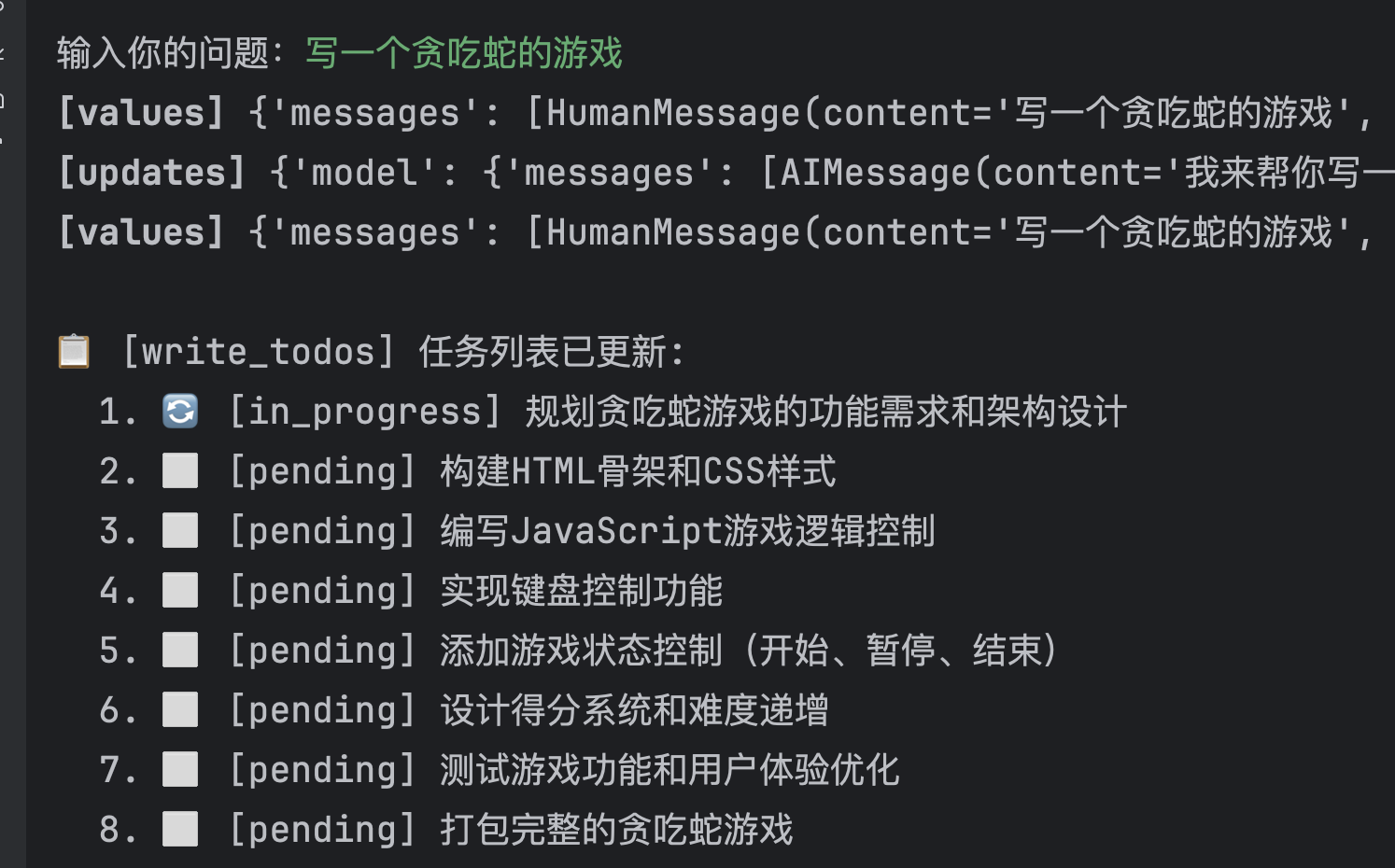
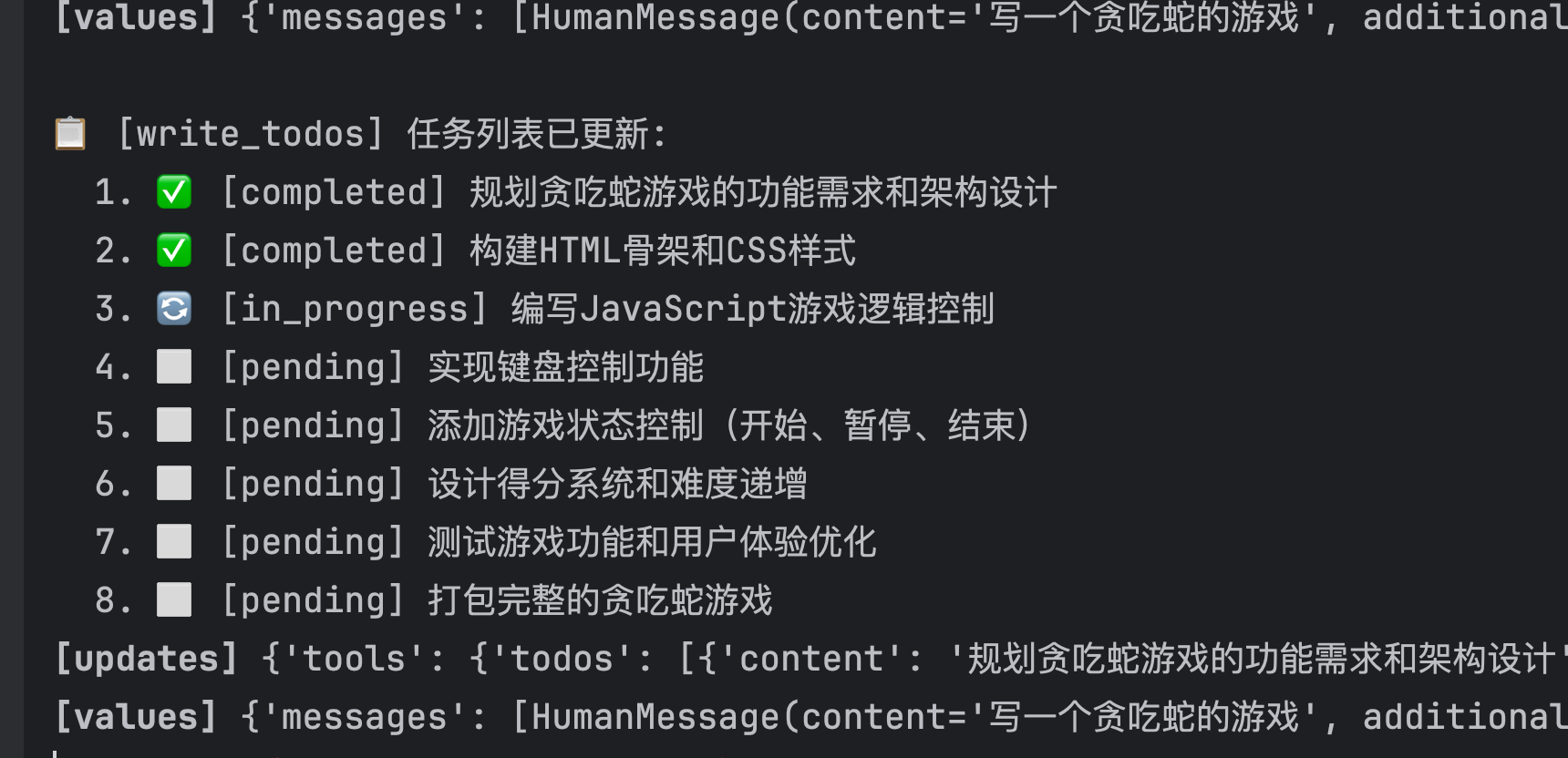
    status_icons = {"pending": "⬜", "in_progress": "🔄", "completed": "✅"}
    formatted = "\n".join(
        f"  {i}. {status_icons.get(t['status'], '❓')} [{t['status']}] {t['content']}"
        for i, t in enumerate(todos, 1)
    )
    print(f"\n📋 [write_todos] 任务列表已更新:\n{formatted}")

    # 统计
    stats = {
        "total": len(todos),
        "pending": sum(1 for t in todos if t["status"] == "pending"),
        "in_progress": sum(1 for t in todos if t["status"] == "in_progress"),
        "completed": sum(1 for t in todos if t["status"] == "completed"),
    }

    return Command(
        update={
            "todos": todos,
            "messages": [
                ToolMessage(
                    content=f"任务列表已更新,共 {stats['total']} 个任务: "
                    f"{stats['completed']} 已完成, {stats['in_progress']} 进行中, {stats['pending']} 待办",
                    tool_call_id=tool_call_id,
                )
            ],
        }
    )


# ============================================================================
# Step 3: 实现 read_todos 工具
# ============================================================================

READ_TODOS_DESCRIPTION = """读取当前任务列表,查看任务规划和进度。

**使用时机:**
- 需要查看当前任务进度
- 决定下一步要做什么
- 汇报任务完成情况

返回当前所有任务及其状态。
"""

from langchain.tools import ToolRuntime


@tool(description=READ_TODOS_DESCRIPTION)
def read_todos(runtime: ToolRuntime) -> str:
    """读取当前任务列表

    Returns:
        格式化的任务列表字符串
    """
    # 从 State 中获取 todos
    todos: list[Todo] = runtime.state.get("todos", [])

    if not todos:
        print("\n📋 [read_todos] 当前没有任务列表")
        return "当前没有任务列表。请使用 write_todos 创建任务列表。"

    # 格式化输出
    status_icons = {"pending": "⬜", "in_progress": "🔄", "completed": "✅"}
    lines = ["当前任务列表:"]
    for i, t in enumerate(todos, 1):
        icon = status_icons.get(t["status"], "❓")
        lines.append(f"{i}. {icon} [{t['status']}] {t['content']}")

    # 统计
    stats = {
        "total": len(todos),
        "pending": sum(1 for t in todos if t["status"] == "pending"),
        "in_progress": sum(1 for t in todos if t["status"] == "in_progress"),
        "completed": sum(1 for t in todos if t["status"] == "completed"),
    }
    lines.append(
        f"\n统计: 共 {stats['total']} 个任务 - "
        f"✅ {stats['completed']} 已完成, 🔄 {stats['in_progress']} 进行中, ⬜ {stats['pending']} 待办"
    )

    result = "\n".join(lines)
    print(f"\n📋 [read_todos]\n{result}")
    return result


# ============================================================================
# Step 4: 实现 task 工具(子 Agent)
# ============================================================================

TASK_DESCRIPTION = """启动一个独立的子Agent来执行特定任务。

子Agent具有:
- 独立的上下文(不会被主对话污染)
- 独立的系统提示词(可定制角色和行为)
- 独立的工具集(可以只提供需要的工具)

**参数说明:**
- system_prompt: 子Agent的角色和行为指令
- task_detail: 详细的任务描述,包含目标、上下文、期望输出
- tools: 子Agent可使用的工具列表(可选,用工具名称)

**适用场景:**
- 独立的复杂多步骤任务
- 需要深度研究/分析的任务
- 需要隔离上下文的任务
- 可并行执行的多个任务

**示例调用:**
task(
    system_prompt="你是一个代码审查专家,专注于发现安全漏洞",
    task_detail="审查以下Python代码的安全性: ...",
    tools=["read_file", "search_code"]
)
"""

# 预定义的可用工具(在实际项目中,这可以是动态获取的)
AVAILABLE_TOOLS: dict[str, Any] = {}


def register_available_tool(name: str, tool_func: Any):
    """注册一个可供子Agent使用的工具"""
    AVAILABLE_TOOLS[name] = tool_func


@tool(description=TASK_DESCRIPTION)
def task(
    system_prompt: str,
    task_detail: str,
    tools: list[str] | None,
    tool_call_id: Annotated[str, InjectedToolCallId],
) -> Command[Any]:
    """启动子Agent执行特定任务

    Args:
        system_prompt: 子Agent的系统提示词,定义其角色和行为
        task_detail: 详细的任务描述,包含目标、上下文、期望输出格式
        tools: 子Agent可使用的工具名称列表(如 ["search_web", "read_file"])
    """
    from langchain.agents import create_agent

    print(f"\n🤖 [task] 启动子Agent...")
    print(f"   📝 System Prompt: {system_prompt[:60]}...")
    print(f"   📋 Task: {task_detail[:60]}...")
    print(f"   🔧 Tools: {tools or '无'}")

    try:
        # 解析请求的工具
        subagent_tools = []
        if tools:
            for tool_name in tools:
                if tool_name in AVAILABLE_TOOLS:
                    subagent_tools.append(AVAILABLE_TOOLS[tool_name])
                else:
                    print(f"   ⚠️ 未知工具: {tool_name}")

        model = init_chat_model(
            # 1. 模型名称 (你的自定义模型名)
            os.environ['OPENAI_MODEL'],

            # 2. 提供商 (对于兼容 OpenAI 接口的服务,这里通常填 "openai")
            model_provider="openai",

            # 3. 自定义参数
            api_key=os.environ['OPENAI_API_KEY'],  # 你的 API Key
            base_url=os.environ['OPENAI_BASE_URL'],  # 你的 Base URL
        )
        # 创建独立的子 Agent
        subagent = create_agent(
            model=model,  # 子 Agent 可以用更便宜的模型
            system_prompt=system_prompt,
            tools=subagent_tools,
        )

        print(f"   ▶️ 子Agent开始执行...")

        # 运行子 Agent(独立上下文,只有任务描述)
        result = subagent.invoke({"messages": [HumanMessage(content=task_detail)]})

        # 提取最后一条消息作为结果
        final_message = result["messages"][-1].content
        print(f"   ✅ 子Agent完成!")
        print(f"   📤 结果: {final_message[:100]}...")

    except Exception as e:
        final_message = f"子Agent执行失败: {e}"
        print(f"   ❌ {final_message}")

    return Command(
        update={
            "messages": [
                ToolMessage(
                    content=final_message,
                    tool_call_id=tool_call_id,
                )
            ],
        }
    )


# ============================================================================
# Step 5: 定义一些可供子Agent使用的工具
# ============================================================================

@tool
def read_file(file_path: str) -> str:
    """读取文件内容

    Args:
        file_path: 文件路径
    """
    print(f"   📄 [read_file] 读取: {file_path}")
    return f"文件内容: {file_path} 的内容..."


register_available_tool('grep_search', file_search.grep_search)
register_available_tool('glob_search', file_search.glob_search)
register_available_tool('read_file', read_file)
register_available_tool('shell', shell_terminal._shell_tool)


# ============================================================================
# Step 6: 创建主 Agent
# ============================================================================

def create_my_agent():
    """创建带有自定义工具的主 Agent"""
    from langchain.agents import create_agent
    model = init_chat_model(

        # 1. 模型名称 (你的自定义模型名)
        os.environ['OPENAI_MODEL'],

        # 2. 提供商 (对于兼容 OpenAI 接口的服务,这里通常填 "openai")
        model_provider="openai",

        # 3. 自定义参数
        api_key=os.environ['OPENAI_API_KEY'],  # 你的 API Key
        base_url=os.environ['OPENAI_BASE_URL'],  # 你的 Base URL
    )

    agent = create_agent(
        debug=True,
        model=model,
        system_prompt="""你是一个智能任务管理助手。

## 可用工具

### 任务规划工具
- **write_todos**: 创建或更新任务列表,用于规划和跟踪进度
- **read_todos**: 读取当前任务列表,查看进度

### 任务执行工具
- **task**: 启动独立子Agent执行复杂任务
  - 可以指定子Agent的角色(system_prompt)
  - 可以指定子Agent可用的工具(tools)
  - 子Agent有独立上下文,不会污染主对话

### 其他工具
- **glob_search**: 搜索文件
- **read_file**: 读取文件
- **grep_search**: 检索文件中的内容
- **shell**: 执行shell命令

## 工作流程

1. 对于复杂任务,先用 write_todos 规划任务分解
2. 执行前用 read_todos 确认当前进度
3. 对于独立的复杂研究/分析任务,用 task 委托给子Agent
4. 完成后更新 todos 状态

## 子Agent可用工具
创建子Agent时,可用的工具有: search_web, read_file, analyze_code
""",
        tools=[
            write_todos,
            read_todos,
            task,
            file_search.glob_search,
            file_search.grep_search,
            shell_terminal.tools[0],
            read_file,
        ],
        state_schema=MyAgentState,
    )

    return agent


# ============================================================================
# Step 7: 运行演示
# ============================================================================


async def run_demo():
    """运行完整演示"""
    print("=" * 70)
    print("🎓 LangChain Todos & SubAgent 完整演示")
    print("=" * 70)

    if not os.getenv("OPENAI_API_KEY"):
        print("\n⚠️  请设置 OPENAI_API_KEY 环境变量")
        print("   export OPENAI_API_KEY='your-key'")
        return

    agent = create_my_agent()

    # Demo 1: 测试 todos
    print("\n" + "=" * 70)
    print("📋 Demo 1: 使用 write_todos 和 read_todos")
    print("=" * 70)

    result1 = await agent.ainvoke(
        {
            "messages": [
                HumanMessage(
                    content=input("输入你的问题:")
                )
            ]
        }
    )
    print(f"\n💬 Agent 回复: {result1['messages'][-1].content[:300]}...")

    # Demo 2: 测试 task(子Agent)
    # print("\n" + "=" * 70)
    # print("🤖 Demo 2: 使用 task 创建子Agent")
    # print("=" * 70)

#     result2 = await agent.ainvoke(
#         {
#             "messages": [
#                 HumanMessage(
#                     content="请创建一个专门的研究助手子Agent,让它帮我研究 Python asyncio 的最佳实践"
#                 )
#             ]
#         }
#     )
#     print(f"\n💬 Agent 回复: {result2['messages'][-1].content[:300]}...")
#
#     # Demo 3: 综合使用
#     print("\n" + "=" * 70)
#     print("🚀 Demo 3: 综合使用 todos + task")
#     print("=" * 70)
#
#     result3 = await agent.ainvoke(
#         {
#             "messages": [
#                 HumanMessage(
#                     content="""我想学习 Web 开发,请帮我:
# 1. 创建学习任务列表
# 2. 对于"了解前端框架"这个任务,启动一个研究助手帮我分析 React 和 Vue 的区别"""
#                 )
#             ]
#         }
#     )
#     print(f"\n💬 Agent 回复: {result3['messages'][-1].content[:500]}...")


# ============================================================================
# 主程序
# ============================================================================

if __name__ == "__main__":
    import sys
    asyncio.run(run_demo())
标题:Langchain 中的 Todos 与 deepagents的Subagent 协作机制
作者:gitsilence
地址:https://blog.lacknb.cn/articles/2026/02/02/1770031802737.html
- Langchain 中的 Todos 与 deepagents的Subagent 协作机制
- 一、什么时候直接完成任务,什么时候调用 write_todos?
- 直接完成任务
- 使用 write_todos
- 二、TodoListMiddleware 的实现原理
- 核心机制
- write_todos 工具参数
- 如何防止 Agent 一次性完成所有 todos?
- 三、什么时候需要调用 task 工具?
- 适合使用 task 的场景
- 不适合使用 task 的场景
- 四、Task 工具的实现原理
- 元数据代码
- task 工具的入参
- SubAgentMiddleware 实现
- 子代理生命周期
- 状态隔离机制
- 五、Todos 与 Task 的协作模式
- 六、最佳实践总结
- Todo 管理
- Task 委派
- 协作原则
- 总结
- 示例代码